
Superscript Generator
Convert any text or number into superscript format instantly, perfect for exponents, mathematical formulas, footnotes, and scientific notation.
Share with others!
Superscript Generator
Typing x² or 10³ manually means clicking through formatting menus in word processors. This superscript generator converts your text instantly. Type or paste any content, click convert, and you’re done.
No complicated keyboard shortcuts or menu hunting required.
The tool transforms regular characters into raised superscript using Unicode formatting. You get results that work everywhere: Google Docs, Microsoft Word, social media posts, emails, and websites. Copy your converted text and paste it anywhere; the formatting stays intact across all platforms.
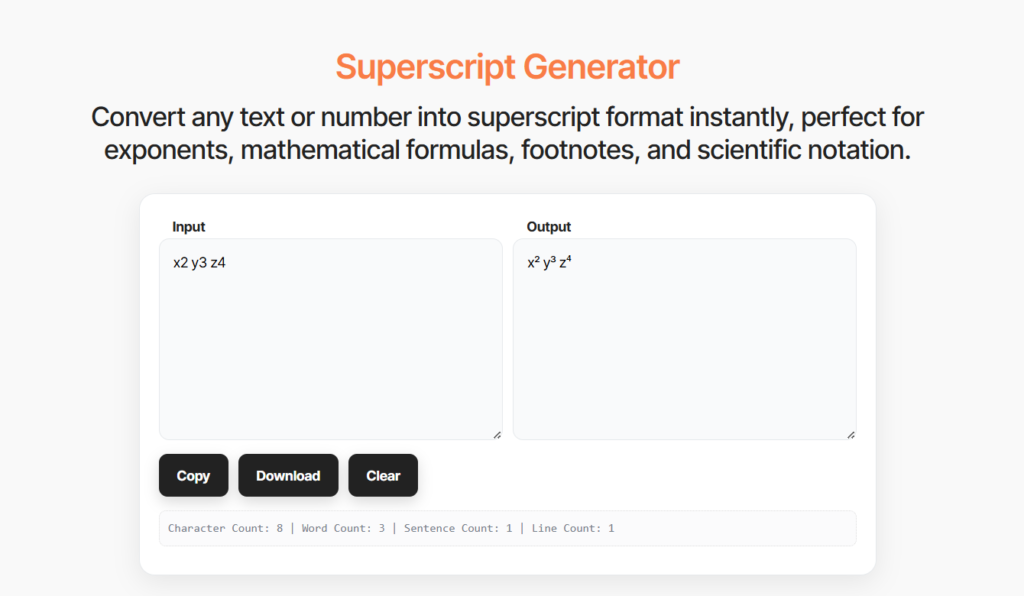
How to Use the Superscript Generator
Convert text to superscript in three simple steps:
- Type or paste your text into the input box above
- Click the ‘Generate Superscript’ button to convert instantly
- Copy your superscript text from the output box and use it anywhere
You see results immediately, and the tool converts as you type for quick previews and adjustments.
Superscript vs. Subscript
Superscript raises text above the baseline (x², 1ˢᵗ), while subscript lowers text below the baseline (H₂O, CO₂). Each serves different purposes in technical writing. You use superscript for exponents, powers, footnotes, and ordinal indicators. Scientists use subscript for chemical formulas, mathematical indices, and molecular notation.
What Is Superscript Text?
Superscripts display characters slightly above the normal text baseline and in a smaller size.
You see this formatting in mathematical notation (x²), academic footnotes (reference¹), and ordinal numbers (1ˢᵗ).
The elevated position helps distinguish special characters from regular text without disrupting line spacing.
Writers and scientists use superscript for technical accuracy in formulas, citations, and scientific notation.
This text formatting conveys specific meanings: exponents denote mathematical powers, raised numbers indicate footnote references, and elevated symbols mark trademarks.
The small, raised characters pack important information into minimal space.
When You Need Superscript Text
Mathematical Exponents
You write exponents for algebra, calculus, and physics without the formatting hassle. Convert x^2 to x², 10^6 to 10⁶, or a^n to aⁿ instantly. The superscript generator handles equations like x²+y²=r² or E=mc² with one click—perfect for homework, research papers, or teaching materials.
Footnotes and References
Academic writing requires numbered footnotes for citations and references. This tool converts regular numbers into proper superscript markers (¹, ², ³) that follow academic citation standards. You add professional-looking references to research papers, articles, legal documents, and scholarly publications without manual formatting.
Ordinal Numbers
Professional documents need properly formatted ordinal indicators for dates, rankings, and positions. Transform ‘1st’ into 1ˢᵗ, ‘2nd’ into 2ⁿᵈ, or ‘3rd’ into 3ʳᵈ for business reports, presentations, and formal communications. Use it for historical dates (March 3ʳᵈ), rankings (1ˢᵗ place), or time periods (21ˢᵗ century).
Chemical Formulas and Notation
Chemistry and physics require precise notation for ionic charges and molecular formulas. Convert regular text into proper scientific notation: Ca²⁺ for calcium ions, O²⁻ for oxide ions, or SO₄²⁻ for sulfate. The exponent writer creates accurate chemical formulas for lab reports, scientific papers, and educational materials.
Trademark and Copyright Symbols
Brand protection requires proper trademark and copyright symbols on legal documents and marketing materials. Add ™ for trademarks, ® for registered marks, © for copyrights, or ℠ for service marks to your brand names. You protect your intellectual property with professional formatting that meets legal standards.
Why Use Our Superscript Generator
Instant Conversion
You type your text and see superscript results immediately. The tool converts characters in real-time as you type, no waiting, no processing delays. Make quick adjustments and see changes instantly for the fastest text formatting experience.
Copy-Paste Ready
One click copies your entire superscript result to your clipboard. Paste it directly into any application, the formatting remains intact across all platforms. You skip the manual selection and copying process, saving time when you’re working with multiple conversions.
Free and Unlimited
You use this tool as many times as you need at absolutely no cost. No account creation, no subscription fees, no hidden charges. Convert single characters or entire documents, there’s no limit on text length or number of conversions. Access full functionality without restrictions.
Privacy Protected
Your text processes entirely in your browser using client-side JavaScript. We don’t send your content to servers, store it in databases, or share it with third parties. You maintain complete privacy and security over your text, what you type stays between you and your device.
Mobile-Friendly
Access the superscript text generator from any device, smartphones, tablets, laptops, or desktop computers. The interface adapts to your screen size for comfortable use on the go. Convert text during meetings, classes, or while traveling without needing your main computer.
Common Superscript Conversions
For Mathematical Expressions:
- x^2 → x²
- 10^6 → 10⁶
- a^n → aⁿ
- 2^10 → 2¹⁰
- E=mc^2 → E=mc²
For Footnotes and References:
- [1] → ¹
- note 3 → ³
- reference 5 → ⁵
- source 2 → ²
For Ordinal Numbers:
- 1st → 1ˢᵗ
- 2nd → 2ⁿᵈ
- 3rd → 3ʳᵈ
- 21st → 21ˢᵗ
- 100th → 100ᵗʰ
The superscript calculator handles all these conversions instantly. Just paste your text and click convert.
Related Text Formatting Tools
Small Text Generator – Create tiny Unicode text for unique social media posts, bios, and creative designs.
Case Converter Tool – Change text case instantly between uppercase, lowercase, title case, and sentence case.
Remove Text Formatting – Strip all formatting from copied text and get clean, plain text ready for any use.
Frequently Asked Questions
What is a superscript generator?
A superscript generator converts regular text into raised characters that appear above the baseline. You paste your content into the tool, click convert, and get superscript formatting using Unicode characters. This lets you create exponents (x²), footnotes (¹), ordinal numbers (1ˢᵗ), and scientific notation without manual formatting in word processors.
How do I use superscript on social media?
Copy your converted superscript text from this generator and paste it directly into social media posts. The Unicode characters work on Twitter, Instagram, Facebook, TikTok, LinkedIn, and other platforms. Your superscript formatting stays intact when you post—followers see the same raised characters you created.
Does superscript work in Word and Google Docs?
Yes, the superscript text works perfectly in Microsoft Word, Google Docs, and most text editors. The Unicode text converter generates standard Unicode characters that all modern applications recognize. Paste your converted text and the formatting stays consistent—you won’t need to reformat after pasting.
Can I create exponents for math homework?
Absolutely. This tool converts your math notation into proper exponents instantly. Type x^2 and get x², type 10^3 and get 10³, or convert complete equations like x²+y²=r². You save time on algebra homework, calculus assignments, physics problems, and any mathematical work requiring exponent notation.
How do I type superscript without this tool?
Most word processors offer keyboard shortcuts—press Ctrl+Shift++ in Microsoft Word or Cmd+Period in Google Docs to access superscript formatting. However, this superscript generator provides faster conversion for bulk text. You paste multiple equations or references at once instead of formatting each character individually through menus.
Is this superscript generator free?
Yes, this online superscript generator is completely free with unlimited use. You convert as much text as you need without creating accounts, paying subscription fees, or hitting usage limits. The tool processes everything in your browser, ensuring your privacy while giving you instant access to superscript formatting anytime.