
Paragraph to Single Line Converter
Transform your multi-line text content into a single continuous line with no line breaks.
Share with others!
Paragraph to Single Line Converter
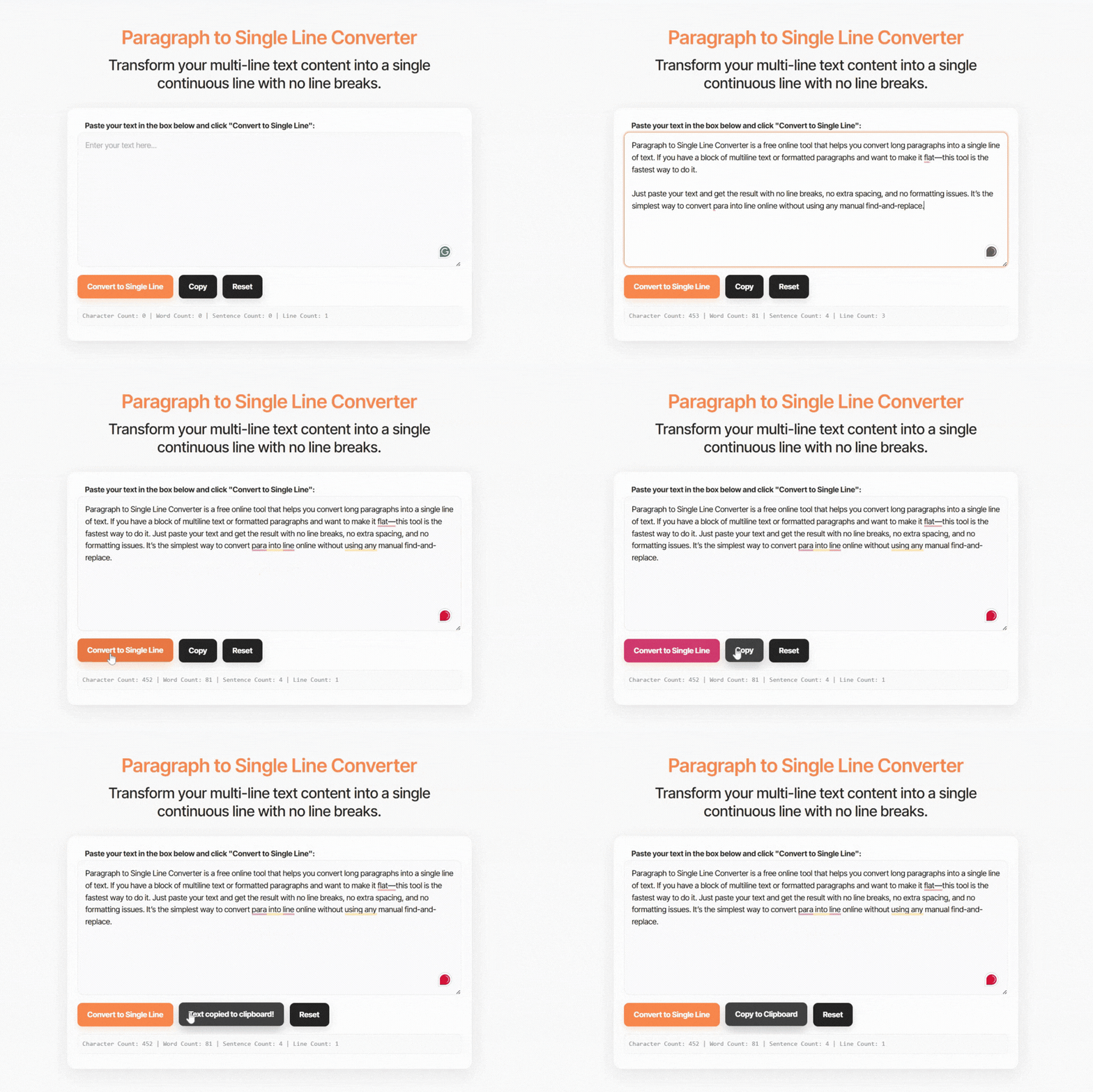
The Paragraph to Single Line Converter removes line breaks from multi-line text and converts it into one continuous line. This is useful when you need to clean formatted paragraphs, prepare text for coding, or flatten content copied from documents.
Simply paste your text into the tool above and it will instantly remove newline characters while keeping the words intact. The output becomes a clean single-line string that you can copy and use anywhere.
This tool works entirely online and processes the text instantly inside your browser.
Understanding the Need for Text Flattening
While manually deleting line breaks might work for a single sentence, it is impossible for large documents. Our tool is optimized for three core use cases:
Clean Up Code
When preparing JSON, HTML, or JavaScript strings, line breaks can often cause syntax errors or increase file size. Using a “Newline to Space” converter allows you to minify your code snippets for better performance.
For Data Scientists
Importing text from PDFs or Word documents into Excel or SQL databases often results in broken rows because of hidden carriage returns. This tool cleans your data, ensuring a “Single Line” format that is 100% compatible with CSV and database uploads.
Email & Chat Formatting
Some messaging apps interpret “Enter” as a send command. Preparing your text in a single line first allows you to paste long-form content without accidental sends.
What Is a Paragraph to Single Line Converter?
A Paragraph to Single Line Converter is a text processing tool that removes newline characters and merges multiple lines into a single continuous line.
Most paragraphs contain line breaks that move text onto a new line. When these breaks are removed, the paragraph becomes a single line of text.
Example:
Original text
This is a paragraph.
It contains multiple
lines of text.
Converted text
This is a paragraph. It contains multiple lines of text.
The tool replaces newline characters with spaces so the text remains readable.
Remove Line Breaks Online Instantly
Text copied from PDFs, emails, or documents often contains unwanted formatting such as extra line breaks. These breaks can cause problems when pasting text into forms, scripts, or databases.
A Remove Line Breaks Online tool solves this by automatically flattening the paragraph.
The converter performs three simple actions:
- detects newline characters
- removes line breaks
- replaces them with spaces
The result is a clean and readable single line.
What Is a Text Flattener?
A text flattener converts structured text with multiple lines into a flat string without line breaks.
Flattening text is commonly required when:
- inserting text into code
- preparing data for spreadsheets
- cleaning copied content
- formatting database entries
- creating inline strings
This process ensures that the text stays in a compact format without breaking structure.
How to Convert a Paragraph to a Single Line
Using the tool is simple.
- Step 1: Paste your paragraph into the input box.
- Step 2: The tool automatically removes line breaks.
- Step 3: Copy the converted single-line text.
This process usually takes less than a second.
Paragraph vs Single Line Text
Understanding the difference helps explain why conversion is needed.
Paragraph text
- contains line breaks
- structured across multiple lines
- used in documents and articles
Single-line text
- contains no line breaks
- appears as one continuous string
- used in programming and databases
The converter simply removes the breaks while keeping the original wording.
Newline to Space Converter Explained
In programming and text formatting, a newline is a special character that tells the system to start a new line.
Common newline characters include:
- \n
- \r\n
A newline-to-space converter replaces these characters with a standard space.
Example:
Input
Line one
Line two
Line three
Output
Line one Line two Line three
The words remain unchanged, but the paragraph becomes one line.
Why People Use a Single Line Text Tool
A single line text tool is useful in many real-world situations.
Some common examples include:
- Programming: Developers often need to convert multi-line text into one line for JavaScript strings, JSON values, or API requests.
- Data processing: Data analysts flatten text before importing it into spreadsheets or databases.
- Content editing: Writers remove unnecessary line breaks when cleaning copied text.
- Form submissions: Some web forms require text to be entered in a single line.
Benefits of Using a Paragraph to Single Line Converter
Using this tool provides several advantages.
- Fast text formatting: The converter removes line breaks instantly.
- Cleaner text output: Your text becomes easier to reuse in scripts, forms, and databases.
- Improved compatibility: Single-line strings work better in programming environments.
- No installation required: The tool runs entirely in your browser.
JavaScript String Formatter
In JavaScript and other programming languages, multiline text can break string formatting.
For example:
const text = “This is a
multi-line
string”;
This will cause an error in many situations.
After using a JavaScript string formatter, the text becomes:
const text = “This is a multi-line string”;
This format is easier to use inside scripts and code blocks.
JavaScript Example for Removing Line Breaks
Developers sometimes remove line breaks directly in JavaScript.
Example:
- let text = “This is a paragraph\nwith multiple\nlines.”;
- let singleLine = text.replace(/\n/g, ” “);
Result
This is a paragraph with multiple lines.
This method replaces newline characters with spaces.
However, using an online JavaScript string formatter tool is often faster for quick formatting.
Frequently Asked Questions
What is a Paragraph to Single Line Converter?
A Paragraph to Single Line Converter removes line breaks from a paragraph and merges all lines into one continuous string of text.
How do I remove line breaks from text?
Paste the text into a remove line breaks tool. The tool will automatically replace newline characters with spaces.
What is a newline character?
A newline character is a formatting symbol that moves text to the next line. It is often represented as \n or \r\n in programming.
Why do developers remove line breaks?
Developers remove line breaks to prepare text for code, JSON data, APIs, and JavaScript strings where multiline formatting may cause errors.
Can I convert text to a single line online?
Yes. Online tools like this single line text converter allow you to paste text and instantly flatten it into one line.
Does removing line breaks change the text?
No. The words remain the same. Only the newline characters are replaced with spaces.