
Small Text Generator
Use a small text generator to convert your words into clean and compact letters.
Share with others!
Small Text Generator
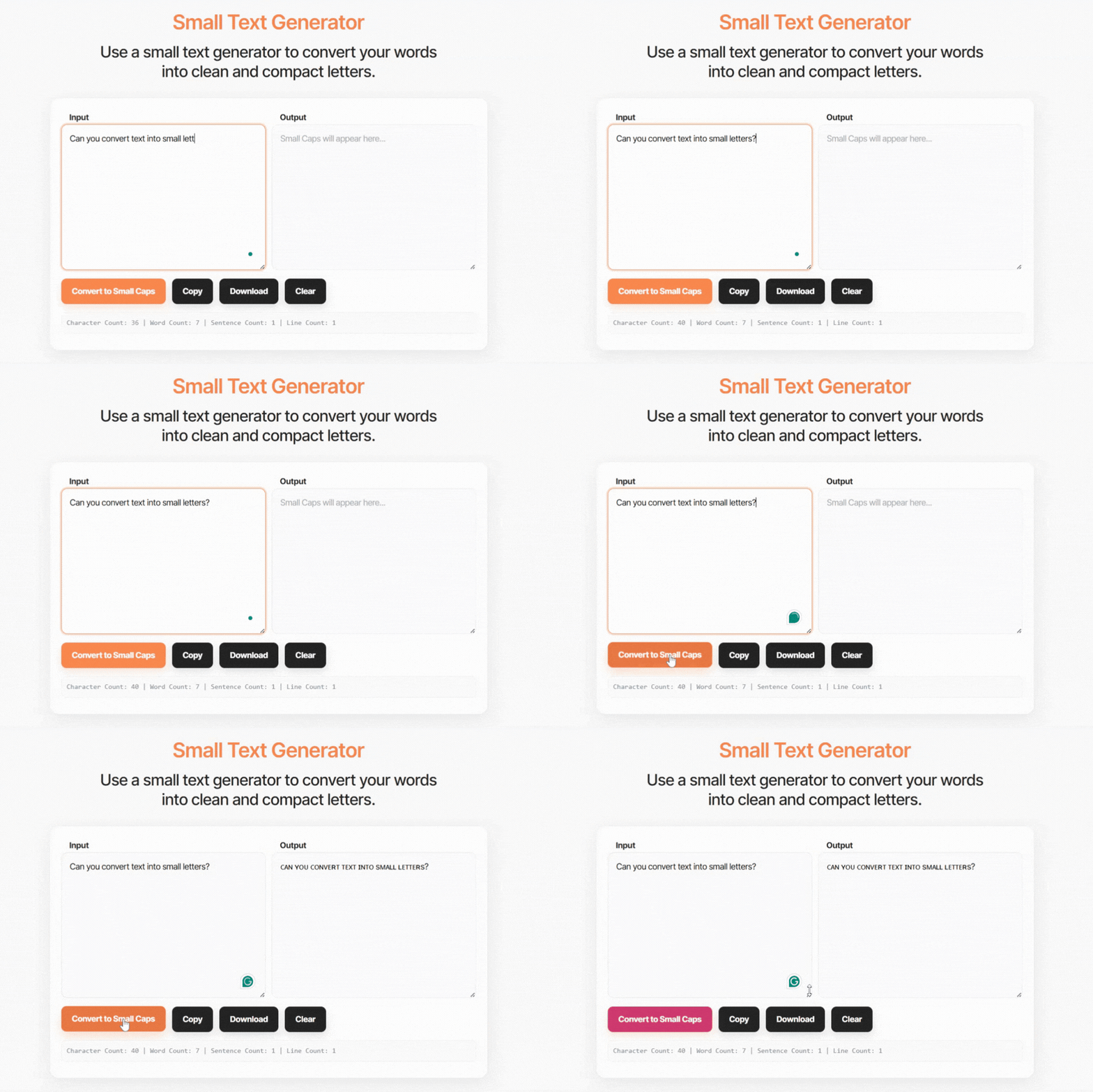
The Small Text Generator converts your standard text into three Unicode small text styles: small caps, superscript, and subscript. Type or paste anything into the box above and all three conversions appear instantly, ready for you to copy and paste into any app, website, or platform that accepts text.
The tool produces real Unicode characters, not a font change. That distinction matters because fonts only display correctly where they are installed. Unicode characters are built into every modern device and platform, which is why you can paste the output directly into an Instagram bio, a Discord username, a tweet, or a Google Doc and it renders identically on every screen.
Writers use it to style social media bios and captions. Students use it to type superscript exponents and subscript chemical formulas in plain text fields. Designers use it to create small caps headings without CSS. Whatever your need, you get three styled outputs in one step with no login and no character limit.
What Is Small Text?
Small text is a collection of Unicode characters that visually resemble smaller versions of standard Latin letters. Each character in the small text alphabet corresponds to a specific code point in the Unicode standard, the global character encoding system that assigns a unique identifier to every character used across every language and writing system on earth.
When you type a letter into this generator, the tool looks up the corresponding Unicode small text character and substitutes it. The result looks like a smaller version of your original text, but it is not a font. It is a completely different character that happens to look small.
This distinction is the reason small text works everywhere you paste it. A font change in Microsoft Word produces text that only looks correct in Microsoft Word. A Unicode character change produces text that looks correct in Instagram, in Discord, in TikTok, in a tweet, in an email subject line, in a Notion page, and in every other platform that renders Unicode, which is essentially every platform built in the last fifteen years.
Example: “Hello World” in small caps becomes “ʜᴇʟʟᴏ ᴡᴏʀʟᴅ”
The characters travel with your text. No installation, no compatibility issues, no extra steps.
Three Small Text Styles Explained
This generator produces three distinct small text styles. Each one uses a different part of the Unicode character set and suits different purposes. Understanding the difference helps you choose the right style for your context before you copy.
Small Caps
Small caps converts every letter into a small capital Unicode character. Whether you type in uppercase, lowercase, or mixed case, the output looks the same: a uniform row of small, blocky capital letters that sit squarely on the text baseline.
The visual effect is clean and balanced. Small caps carry the structure of capital letters without the height and visual dominance of full-size capitals, which makes them readable in long strings like profile bios, display names, and section headings.
Example: “Hello World” becomes “ʜᴇʟʟᴏ ᴡᴏʀʟᴅ”
Small caps have the most complete Unicode alphabet of the three styles. Most letters convert successfully, including all 26 standard Latin characters.
Best for: Instagram bios, Twitter and X display names, Discord usernames, TikTok profile names, aesthetic social media captions, and anywhere you want a small, structured text appearance.
Superscript
Superscript converts letters into raised Unicode characters that sit above the text baseline. You see this formatting in mathematical notation for exponents (x², 2⁴), in ordinal numbers (1st, 2nd, 3rd), in footnote markers, and in certain creative social media styling where a light, elevated appearance is the goal.
The Unicode superscript alphabet covers most but not all letters. A handful of letters have no superscript Unicode equivalent. When the generator encounters a letter with no superscript character, it leaves the original character in place rather than substituting a visually incorrect alternative. This means some superscript outputs will contain a mix of raised and standard characters.
Example: “hello” becomes “ʰᵉˡˡᵒ”
Best for: Mathematical exponents and powers, footnote markers in plain text editors, ordinal numbers in messaging apps, and creative caption styling on social media platforms.
Subscript
Subscript converts letters into lowered Unicode characters that sit below the text baseline. Scientific writing uses subscript for chemical formulas (H₂O, CO₂, C₆H₁₂O₆) and for mathematical variables with index notation. It appears in technical documentation, chemistry notes, and physics problem sets wherever standard text editors do not support rich text formatting.
The subscript Unicode alphabet has the most gaps of the three styles. Several common letters have no subscript equivalent in the Unicode standard. The Unicode Consortium has not yet assigned subscript code points to every letter, so full subscript conversion of arbitrary text is not possible with the current standard. The generator converts every letter that has a subscript equivalent and leaves the rest unchanged.
Example: “hello” becomes “ₕₑₗₗₒ”
Best for: Chemical formulas, scientific variable notation, technical documentation written in plain text, and mathematical expressions typed into messaging apps, note-taking tools, or platforms without equation editors.
How to Use the Small Text Generator
Generating small text takes four steps.
- Type or paste your text into the input box above. You can paste content from any source: a Word document, a Google Doc, an email, a notes app, or a webpage. The generator has no character limit and handles single words, full sentences, and multi-paragraph content equally.
- Watch the output appear in real time. The generator converts your text into all three styles simultaneously as you type. You do not need to click separate buttons or switch between modes to see small caps, superscript, and subscript. All three appear at the same time beneath the input.
- Click the Copy button next to the style you want. Each output row has its own Copy button so you can grab one style without selecting or highlighting the text manually.
- Paste the result into any text field on any platform. The characters paste as plain text and display correctly on every platform that supports Unicode, which includes every major social media app, messaging service, document editor, and website.
Where to Use Small Text Generator
The small text generator tool works on any platform that supports Unicode, which is most of them. These are the most common places people use it, and what to know about each one.
Instagram.
Instagram supports Unicode in bios, captions, comments, and story text. Small caps paste directly into the Instagram app on iOS and Android with no additional steps. Many Instagram users style their entire bio in small caps to create a visual identity that stands out from standard text. Captions written in small caps draw attention in the feed without using all-caps formatting, which reads as aggressive.
Discord.
Discord supports Unicode in usernames, server nicknames, status messages, and chat messages. Small caps in a Discord username give it a distinctive appearance that standard text cannot replicate. Superscript works inside Discord messages for mathematical notation or for stylistic effect. Server moderators sometimes use small caps in channel names and category headers to create a consistent visual hierarchy.
TikTok.
TikTok supports Unicode in bios and video captions. Small caps in a TikTok bio give the profile a polished, editorial appearance that contrasts with the casual style of most profiles on the platform.
Twitter and X.
Unicode characters in display names and bios paste correctly into Twitter and X. Each Unicode small text character counts as one character toward the platform’s limits, the same as any standard letter.
Science and academic writing.
Students and researchers who work in plain text environments use superscript for exponents, footnote markers, and ordinal notation. Subscript covers chemical formulas and indexed variables. Both styles work in messaging apps, shared notes, and any editor that does not support rich text or LaTeX formatting.
Username creation.
If your preferred username is already taken on a platform, replacing one or two standard letters with their small caps equivalents produces a visually similar but technically distinct handle. The small caps version of a letter is a different Unicode code point from its standard version, so platforms treat it as a unique username. This workaround is widely used on Instagram, Discord, and gaming platforms where popular usernames fill up quickly.
How the Small Text Generator Works
Small text generator works by mapping each character you type to its Unicode equivalent in the small caps, superscript, or subscript character sets.
Unicode is an international character encoding standard maintained by the Unicode Consortium. It assigns a unique numerical code point to every character used across all human writing systems: standard Latin letters, accented characters, Arabic script, Chinese characters, mathematical symbols, and thousands of other glyphs. As of Unicode 15, the standard covers more than 149,000 characters. Every modern operating system, browser, and platform uses Unicode, which is why a character encoded in Unicode displays consistently everywhere.
When you type the letter A into this generator, it looks up the Unicode code points for the small caps version (U+1D00), the superscript version (U+1D2C), and the subscript version. It substitutes each one and outputs three rows of converted text.
| Standard | Small Caps | Superscript | Subscript |
|---|---|---|---|
| A | ᴀ | ᴬ | ₐ |
| B | ʙ | ᴮ | No equivalent |
| E | ᴇ | ᴱ | ₑ |
| H | ʜ | ᴴ | ₕ |
| O | ᴏ | ᴼ | ₒ |
Not every letter has a Unicode equivalent in all three styles. The subscript alphabet is the most incomplete, with several letters currently unassigned in the Unicode standard. Where no equivalent exists, the generator leaves the original character unchanged. This is correct behaviour, not an error.
Accessibility Note
Unicode small text characters are not standard letters. They are distinct Unicode characters that happen to look like smaller versions of letters. Screen readers, the software that visually impaired users rely on to read digital content, treat them accordingly.
A screen reader may read the superscript Unicode character for the letter h as “modifier letter small h” rather than simply “h.” It may read a full sentence in superscript as a long string of technical character names rather than as the words you intended. Subscript has similar behaviour. Small caps perform slightly better with screen readers but still carry some risk of misinterpretation.
For content that visually impaired users need to read accurately, including public-facing website copy, official documents, and product descriptions, standard text is the correct choice.
Small text generator works best in contexts where aesthetic styling is the goal and screen reader compatibility is not a priority: social media bios, usernames, captions, and creative personal profiles.
Related Text Tools
These tools cover related text transformation tasks:
- Superscript Generator converts text and numbers into superscript Unicode characters with full support for numeric exponents and ordinal notation.
- Tiny Text Generator produces a specific tiny text style for social media styling and creative captions.
- Mirror Text Generator flips your text horizontally to produce reversed display text for creative and decorative use.
- Wingdings Translator converts standard letters into Wingdings symbols or decodes Wingdings text back into readable characters.
- Case Converter transforms text between uppercase, lowercase, title case, sentence case, and five other formats from a single tool.
Frequently Asked Questions
What does a small text generator do?
A small text generator takes standard text and converts each letter into its Unicode small text equivalent, producing small caps, superscript, or subscript output that you can copy and paste into any platform. The characters are real Unicode glyphs, not a font change, which means they paste correctly and display consistently on every device without any installation.
Why does small text copy and paste correctly on every platform?
The output uses Unicode characters rather than a custom font. Unicode is the global character encoding standard built into every modern operating system, browser, and application. Because the characters are part of the Unicode standard, every platform that renders Unicode displays them correctly. Font-based styling only works where the specific font is installed. Unicode styling works everywhere.
What is the difference between small caps, superscript, and subscript?
Small caps characters sit on the text baseline and resemble miniature capital letters. Superscript characters sit above the baseline and are used for exponents, footnote markers, and ordinal numbers. Subscript characters sit below the baseline and appear in chemical formulas and mathematical variable notation. Each style uses a different set of Unicode code points and suits different contexts and use cases.
Does small text work on Instagram, Discord, and TikTok?
Yes. Instagram, Discord, and TikTok all support Unicode characters in bios, usernames, captions, and messages. Paste the output from this generator directly into any text field on those platforms. The small text displays correctly on every device that accesses the platform, including iOS, Android, and desktop browsers, without any additional formatting steps.
Can screen readers read small text correctly?
Screen readers may not read Unicode superscript and subscript characters as their letter equivalents. Some screen readers read each character by its formal Unicode name rather than its visual appearance, which makes the text confusing or meaningless for visually impaired users. Small caps perform better but still carry some risk. Use standard text for any content where accessibility matters.