
Mirror Text Generator - Flip Your Text Horizontally
Create mirror text that reads backwards, perfect for social media posts, graphic designs, and creative projects.
Share with others!
What Is Mirror Text Generator?
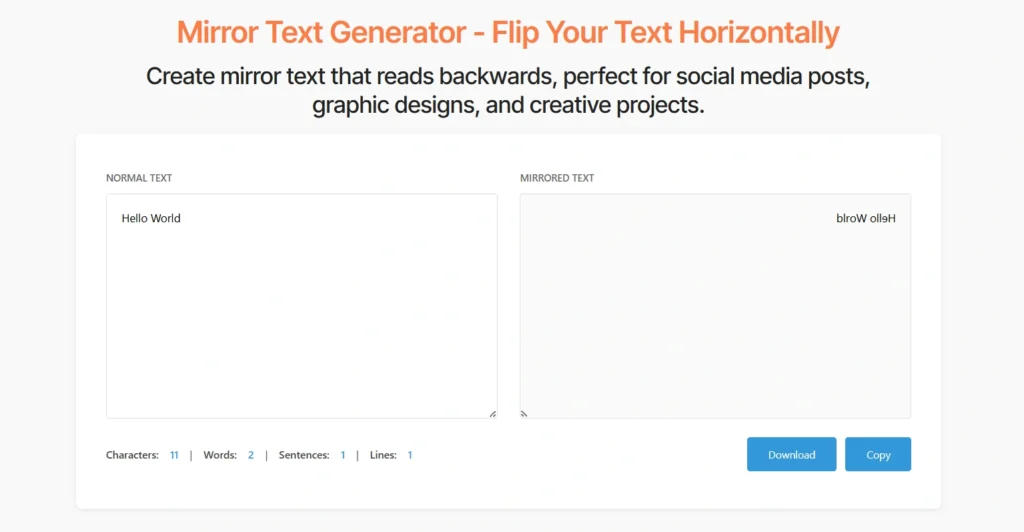
Mirror text generator flips your writing horizontally, creating backwards text that reads like a reflection. Type “Hello” and watch it transform into “olleH”, the characters reverse their order, moving from right to left instead of left to right. You paste your text into the box above, and the generator creates an instant mirror version you can copy and use anywhere.
This tool handles any content you throw at it. Mirror a single word for a logo design, flip an entire paragraph for a creative writing project, or reverse your username to stand out on social platforms. The backwards text appears immediately as you type, giving you real-time feedback on how your mirrored content looks. You don’t need special software or design skills, paste, mirror, and copy.
Think of this as holding text up to a physical mirror. The reflection shows reversed writing, but instead of needing an actual mirror to read it, you create the backwards version directly. Some characters look nearly identical when flipped (like “o” or “v”), while others change their visual appearance dramatically (like “b” becomes “d” in appearance when the reading position reverses).
How to Create Mirror Text
Transform your text into backwards writing with these simple steps:
- Type or paste your text into the input box at the top of this page
- Watch the transformation happen as your text flips horizontally in real-time
- Click the “Copy” button to grab your mirrored text instantly
- Paste your backwards text anywhere you need it—social media, designs, or documents
The generator processes your content character by character. What sits at the end of your sentence moves to the beginning, and what starts your text shifts to the end. You get perfectly mirrored writing without manually retyping or rearranging anything.
Want to test it? Try mirroring your name or a favorite quote. You’ll see how the backwards version creates an eye-catching effect that makes people pause and look twice.
How Mirror Text Actually Works
Mirror text creates horizontal reflections by reversing character order. The generator takes the last character in your text and moves it to the first position, then continues working backwards through your content. “Mirror” becomes “rorriM” because the final “r” shifts to the start.
This differs from other text transformations you might encounter. Upside-down text rotates characters 180 degrees vertically—”b” becomes “q” visually. Reverse text might flip individual letter shapes while maintaining order. Mirror text specifically focuses on reversing the sequence while keeping each character recognizable.
Some letters look nearly identical when mirrored. Characters like “o,” “x,” “v,” “w,” and “A” maintain their appearance because they’re symmetrical. Others change dramatically—”b,” “d,” “p,” and “q” flip their orientation. Numbers like “3” and “5” show clear differences when reversed.
You might wonder about spaces and punctuation. These reverse along with letters and numbers. “Hello, world!” becomes “!dlrow,olleH” with the exclamation point moving to the front and the comma staying between words (but those words now appear backwards). The spatial relationships between characters flip but remain proportionally correct.
Understanding Different Text Effects
People sometimes confuse mirror text with similar transformations. Here’s how they differ:
- Mirror Text reverses character order, creating backwards reading. “Code” becomes “edoC”—you read from right to left instead of left to right.
- Reverse Text typically means the same thing as mirror text. Both terms describe a backwards character sequence, though some tools distinguish between them slightly.
- Upside Down Text flips characters vertically using special Unicode symbols. “Hello” becomes “ollǝH” where letters rotate 180 degrees and also reverse order.
- Backwards Writing is another term for mirrored text. You write in the opposite direction, creating text that requires a mirror to read normally.
- Flipped Text might refer to either horizontal (mirror) or vertical (upside down) transformations. Context determines which flip someone means.
Choose mirror text when you specifically want horizontal reversal without changing individual character shapes. You maintain readability for anyone who views your text in a mirror or can read it backwards. For other creative effects like upside-down letters or corrupted glitch text, explore our related text transformation tools.
Mirror Text in History and Culture
Leonardo da Vinci famously wrote his notebooks in mirror text. Historians debate his reasons—some suggest he protected his ideas from casual readers, others propose he wrote left-handed and found reversed writing more comfortable. You recreate this Renaissance technique instantly with our generator.
Ambigrams use mirror principles to create words readable from multiple orientations. Designers craft text that appears identical when flipped, rotated, or mirrored. You see these clever designs on book covers, logos, and artistic pieces.
Some languages naturally use right-to-left writing, like Arabic and Hebrew. While not exactly mirrored text, these scripts demonstrate how reading direction affects text perception. You appreciate how English speakers find backwards text unusual, yet millions of people read right-to-left daily.
Children sometimes develop mirror writing naturally when learning to write. Young students occasionally reverse letters or write entire words backwards without instruction. Teachers recognize this as a normal developmental phase, showing how humans perceive letters and symbols.
Tips for Using Mirror Text Effectively
Test your platform first: Some social media sites or apps strip unusual characters or reformat text. Copy your mirrored text and paste it where you plan to use it. Make sure it appears correctly before publishing.
Combine with normal text: Create contrast by mixing regular and mirrored text in designs. You place a standard headline above backwards body text, or alternate between normal and reversed lines. This juxtaposition creates visual interest.
Use sparingly for readability: Mirrored text works best as an accent or effect, not for large text blocks. You frustrate readers if they must decode entire paragraphs backwards. Reserve mirror text for headlines, short captions, or decorative elements.
Consider your audience: Not everyone finds backwards text engaging. Older audiences or people with reading difficulties might struggle with mirrored content. You balance creativity with accessibility based on who sees your work.
Pair with images: Show the mirror trick in action. You post a photo holding mirrored text to an actual mirror, or create a split image with normal and backwards versions side by side. Visual context helps people understand the effect.
Explain the concept: Add a simple note like “Hold to mirror” or “Backwards text challenge” when using mirrored writing. You guide viewers to interact with your content rather than leaving them confused.
When You Need Mirrored Text
Social Media Posts That Stand Out
Consider your audience: Not everyone finds backwards text engaging. Older audiences or people with reading difficulties might struggle with mirrored content. You balance creativity with accessibility based on who sees your work.
Pair with images: Show the mirror trick in action. You post a photo holding mirrored text to an actual mirror, or create a split image with normal and backwards versions side by side. Visual context helps people understand the effect.
Explain the concept: Add a simple note like “Hold to mirror” or “Backwards text challenge” when using mirrored writing. You guide viewers to interact with your content rather than leaving them confused.
Graphic Design Projects
Add artistic flair to posters, flyers, and digital artwork with reversed text. Designers use mirror text to create visual symmetry—you place normal text on one side and its backwards reflection on the other, forming balanced compositions that please the eye. This technique appears in concert posters, album covers, and brand identity work.
Mirror text also adds depth to layered designs. You overlay backwards text behind foreground elements, creating subtle background texture without overwhelming the main visual. The reversed characters become decorative elements that enhance the overall design without competing for attention.
T-Shirt and Merchandise Designs
Create apparel graphics that read correctly in photographs and selfies. When someone takes a mirror selfie wearing your shirt, the mirrored text appears normal in the photo—a clever trick that social media users love. Your design becomes interactive, encouraging buyers to share photos that showcase the reversed text effect.
You also craft intentional artistic statements with backwards writing. Streetwear brands use mirror text to create edgy, unconventional designs that appeal to fashion-forward audiences. The reversed characters become part of the aesthetic, not just readable text.
Creative Writing and Puzzles
Design coded messages for treasure hunts, escape rooms, and educational games. You hide clues in mirrored text, challenging participants to use mirrors or decode the backwards writing mentally. This adds an extra layer of difficulty to puzzles without requiring complex encryption.
Authors use mirror text in stories to represent secret languages, alien writing, or magical symbols. You create visual interest on the page while suggesting otherworldly communication. Readers encounter these reversed passages and feel immersed in your fictional world.
Profile Names and Gaming Usernames
Stand out on gaming platforms and social networks with backwards display names. You create memorable usernames that people notice and remember because they look different from standard text. On platforms where everyone competes for attention, mirrored text gives you instant visual distinction.
Gaming communities particularly embrace creative text effects. You signal membership in specific groups or express your personality through unconventional text styling. The backwards characters become part of your online identity.
Educational Activities
Teach children about symmetry, reflections, and mirror writing concepts. You demonstrate how Leonardo da Vinci wrote his notebooks in reverse text, possibly to keep his ideas private or because he was left-handed and found it more natural. Students recreate this Renaissance technique using the mirror text generator, connecting with Renaissance innovation.
Science teachers use mirrored text in lessons about light reflection and optics. You show students how mirrors reverse images, then let them experiment with backwards writing to understand the principle hands-on. The generator makes the concept tangible and fun.
Get Started with Mirror Text
Ready to create your first backwards text? Use the mirror text generator at the top of this page right now. Type your message, watch it flip horizontally, and copy the result with one click.
The tool works with any text you need to transform. You can mirror social media captions, design elements, creative writing projects, or gaming usernames. The backwards characters appear instantly—no waiting, no complicated steps.
Need other text transformations? Try our small text generator to create tiny Unicode characters for unique formatting. Our case converter handles uppercase, lowercase, title case, and sentence case conversions. Convert long content blocks with the paragraph into line tool, it removes line breaks and merges paragraphs into single lines.
You’ve got free access to this mirror text tool with no signup required and no usage limits. Bookmark this page for instant access whenever you need backwards writing. Start experimenting with mirrored text today and discover creative ways to make your content stand out.
Frequently Asked Questions
What is mirror text?
Mirror text is horizontally flipped writing that reads backwards. You reverse the character order so text appears as it would in a mirror reflection. For example, “mirror” becomes “rorrim” with the last letter moving to the first position. This creates text that reads from right to left instead of the standard left-to-right direction.
The transformation flips the sequence of characters while keeping each letter recognizable. You don’t rotate or change the letters themselves—you simply reverse their order. Hold the mirrored text up to a physical mirror, and it appears normal again, reading correctly in the reflection.
How do I copy mirrored text?
Click the “Copy” button directly below the mirrored text output box. The tool automatically copies your backwards text to your clipboard in one action. You don’t need to manually select the text or use keyboard shortcuts.
After clicking Copy, paste your mirrored text anywhere you need it. Press Ctrl+V on Windows or Command+V on Mac to paste into documents, social media posts, design software, or messaging apps. The backwards text transfers exactly as shown in the generator.
Does mirror text work in all languages?
Yes, the generator mirrors any alphabet or character set. You flip English, Spanish, French, German, Russian, Arabic, Chinese, Japanese, Korean, and other languages. The tool processes all Unicode characters, which covers virtually every writing system humans use.
Character order reverses regardless of the language’s natural reading direction. Even right-to-left languages like Arabic and Hebrew get mirrored by this tool, though that creates left-to-right text (effectively “normal” direction for English speakers). Any symbols, punctuation marks, or special characters in your text flip along with letters and numbers.
Can I mirror text on mobile devices?
Yes, the mirror text generator works perfectly on phones and tablets. Open your mobile browser (Safari, Chrome, Firefox, or others) and visit this page. The tool adapts to your screen size automatically, making the text boxes and buttons easy to tap.
Type directly on your mobile keyboard or paste text you’ve copied from other apps. The mirroring happens instantly, just like on desktop computers. Tap the Copy button to grab your backwards text, then switch to any app and paste it where needed. No app installation or special permissions required.
Will mirrored text display correctly everywhere?
Mirrored text displays wherever standard text works, but results vary by platform. Most apps and websites show backwards text exactly as you paste it—the reversed characters appear normally since they’re still regular Unicode letters, just in a different order.
Some platforms have restrictions on text formatting or character sequences. Social media sites might strip certain characters they consider unusual or potentially problematic. Email clients occasionally reformat text based on their display settings. We recommend testing your mirrored text on the target platform before publishing.
Copy a sample, paste it where you plan to use it, and verify it appears correctly. If the platform changes or strips your text, you know to adjust your approach or choose a different platform.
Is mirror text the same as reverse text?
Yes, mirror text and reverse text mean the same thing. Both terms describe backwards character order where text reads right-to-left instead of left-to-right. “Hello” becomes “olleH” whether you call it mirrored or reversed.
Some people use “reverse text” more broadly to include any backwards writing effect, while “mirror text” specifically emphasizes the reflection concept. In practice, these terms are interchangeable. You’ll find both names used across different text transformation tools and websites, all referring to the same horizontal character flip.
Why would I use backwards text?
Backwards text serves creative, practical, and educational purposes. You create eye-catching social media content that stands out in feeds and encourages engagement. People notice mirrored text because it looks different from normal writing, making them stop and interact with your post.
Designers use mirror text for symmetrical compositions, artistic effects, and merchandise that looks correct in photos. Teachers use it to demonstrate scientific concepts about reflection and light. Puzzle creators incorporate backwards writing into challenges and treasure hunts.
You also find it useful for usernames that need to be unique and memorable. Gaming platforms and social networks let you use mirrored characters in display names, helping you stand out from millions of other users.
Can I undo the mirror text back to normal?
Yes, mirror the backwards text again to restore it to normal. Since mirroring reverses character order, running the same text through the generator twice returns it to the original. “Hello” becomes “olleH” on the first mirror, then “olleH” becomes “Hello” when you mirror it again.
This works because the transformation is symmetrical. You flip the order one direction, then flip it back the other direction. The generator doesn’t know whether text is “normal” or “backwards”—it just reverses whatever character sequence you give it.
Does mirror text work with emojis?
Yes, emojis flip along with regular text characters. You place emojis in your text, and the generator reverses their position in the sequence. “Hello 👋 World 🌍” becomes “🌍 dlroW 👋 olleH” with emojis moving to new positions as the characters reverse.
The emojis themselves don’t flip or rotate; they maintain their normal appearance and orientation. Only their position in the text string changes. This lets you create creative combinations where emojis punctuate mirrored text in interesting ways.
How long can my mirrored text be?
The generator handles any text length without restrictions. You mirror single words, short phrases, full sentences, multiple paragraphs, or entire documents. The tool processes your content regardless of how many characters you paste.
Longer texts take the same amount of time to mirror as short ones, the transformation happens instantly. You’re not limited by character counts or word limits. Copy an entire article or book chapter if needed, and the generator flips all of it backwards correctly.
Will mirror text affect my website's SEO?
Using mirrored text for decorative purposes won’t help or hurt SEO, but using it for main content harms rankings. Search engines read backwards text as gibberish—they can’t extract meaningful keywords or understand the content. You lose ranking potential for any text displayed only in mirrored form.
Reserve mirror text for visual effects, headers, or decorative elements. Keep your main content, product descriptions, and important information in normal text that search engines can read and index. This balances creative design with search visibility.
Can I customize how the mirroring works?
This tool performs standard horizontal character reversal—the most common mirror text transformation. You input normal text and receive backwards output with characters in reversed order. The generator doesn’t offer customization options because mirror text has one standard definition.
For different text effects, explore our related tools. You’ll find upside-down text converters, strikethrough generators, and other transformation tools that modify text in different ways. Each tool specializes in one specific effect, ensuring you get clean, reliable results.